Showing posts with label Android Launcher. Show all posts

Sunday, October 16, 2016

Prisma - Art Photo Editor for Android [LATEST APK]

Prisma for Android APK
Prisma wind is blowing all around the social networking sites. If you're connected with the any popular social networking site like Instagram, Facebook, Twitter, VK.com, then you're very much familiar  with this Photo Art App. Earlier Prisma APP was only available on Apple App Store. But a few days ago Prisma Labs officially launched the 1st version of Prisma for the Android Device users.


Prisma transforms your photos into artworks using the styles of famous artists: Munk, Picasso as well as world famous ornaments and patterns. A unique combination of neural networks and artificial intelligence helps you turn memorable moments into timeless art. So, Lets Be an artist! Turn your photos into awesome artworks:
  • Modern art filters
  • Stunning photo effects
  • Fast sharing
  • Fully Modded APK

Prisma At a Glance:
  • App Name: Prisma - Art Photo Editor
  • Current Version: v1.1.52
  • Requires Android: 4.0 and up
  • Offered By: Prisma Labs, inc.

What's New in Version 1.1:
  • Prisma is more faster now.
  • No Watermark by default

Download > Install and Prisma your Photos:
  • Download the Prisma APK file from the link given below.
  • *If you're downloading from PC then transfer the APK file to you'r Android Phone.
  • Now Tap on the APK file and complete the Installation normally.

That's it, after installing Prisma on your Android device, Just Open the App and choose the photos from your phone gallery or you can take Photos directly from the Prisma App. After selecting your photos, now apply the Prisma Filters on the Photo. You can also control the Contrast of the Filter by taping on the Prisma Filter Applied Photos.

Prisma for Android APK


Download Links:


Please Share This Post
Stay with https://techie-asif.blogspot.com/ for more IT related post

Friday, July 22, 2016

Android Marshmallow Launcher PRO APK [LATEST]

Android Marshmallow Launcher Pro
Android 6.0 Marshmallow is the latest version of Android. It brings many new features with new design. If you want experience the Android Marshmallow feel in your Android Phone without moving to the Android Marshmallow then use the Marshmallow Launcher that I'm gonna share in this post. Lets know more about this excellent Android Launcher.


About the Launcher:
  • Name & Version: Marshmallow Launcher Pro v1.1.4
  • Requirement: Android 4.1 and up
  • Developer: Prime App

Key Features:
  • Customize Desktop - Screen grid size customization, lock desktop, hide search bar etc.
  • Customize App Drawer - Hide apps from drawer, show / hide favorite apps, icon customization etc.
  • Icon Packs- Support thousands of icon themes on the Play Store.
  • Infinite scroll - Loop through the desktop or drawer continuously, never far from your favorite page.
  • Scrollable Dock -Support 5 dock pages and customizable dock icons.
  • Fast - Marshmallow Launcher is super fast and smooth.

Changelog: v1.14
  • Fix bugs

Download > Install and Launch Marshmallow:
  • Download the Marshmallow Launcher APK file from the link given below.
  • *If you're downloading from PC then transfer the APK file to you'r Android Phone.
  • Now Tap on the APK file and complete the Installation normally.

That's it, Once the installation is completed, then you are ready to experience Android Marshmallow on your Android Phone without having Android 6.0. Just open the Marshmallow Launcher App and Enjoy. 

Android Marshmallow Launcher Pro


Download Links:


Please Share This Post 
Stay with techie-asif.blogspot.com for more IT related post

Tuesday, June 14, 2016

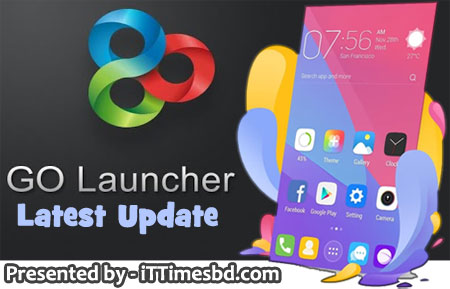
GO Launcher - Theme & Wallpaper [Latest Update]

GO Launcher - Theme & Wallpaper
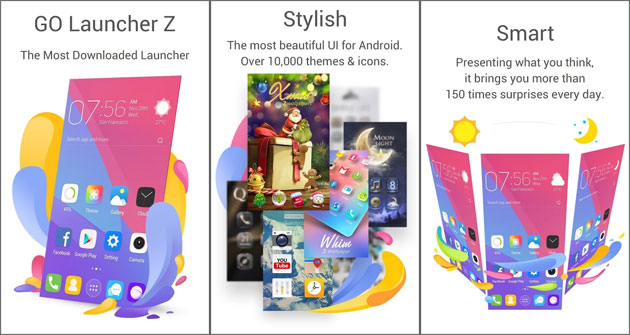
GO Launcher - Theme & Wallpaper: GO Launcher is a stylish, smart & slim system for your Android phone. The 2016 brand new version GO Launcher Z provides 365-day updated themes & HD wallpapers to decorate your screen, and abundant widgets, gestures & tools to make your ideal phone. Its previous version “GO Launcher EX” ranked as NO.1 launcher in Google Play with over 200 million users.


At a Glance: GO Launcher
  • Current Version: GO Launcher v2.11
  • Last Update: June 11, 2016
  • Requires Android: Varies with device
  • File Type: APK file
  • Offered By: GO Dev Team @ Android
Free Features:
  • GO Panel to add frequently used features with just one click (New)
  • More than 10,000 personalized themes (keep increasing)
  • Super smooth flipping and transition effects provided by 3D core
  • 25+ fancy transition effects
  •  15+ widgets available for free (weather, clock, switch, calendar…)
  •  Launch apps using gestures
 Whats New:
  • (Improvement) Performance improved, more faster and more frequent
  • (Improvement) Bug fixed
GO Launcher - Theme & Wallpaper


Download Links:

Please Share This Post 
Stay with techie-asif.blogspot.com for more IT related post

Thursday, February 25, 2016

Nova Launcher Prime APK [LATEST UPDATE]

Nova Launcher Prime APK
The highly customizable, performance driven, home screen Accept no substitutes! Nova Launcher is the top launcher for modern Android, embracing full Material Design throughout. Nova Launcher replaces your home screen with one you control and can customize. Change icons, layouts animations and more.


Regular Features:

  • Ok, Google – Use Google Search’s hotword right from the home screen, just say the words Ok, Google.
  • Color Theme – Set the highlight accent color for the launcher
    Also individual Color controls for labels, folders, unread count badges, drawer tabs and background
  • Icon Themes – Find thousands of icon themes for Nova Launcher on the Play Store
  • Subgrid positioning – Much greater control than standard launchers, Nova Launcher allows you to snap icons or widgets half way through the desktop grid cells
  • Customize App Drawer – Custom tabs, Vertical or Horizontal scrolling, Custom effects
  • Infinite scroll – Never far from your favorite page, loop through the desktop or drawer continously
  • Backup/Restore – Sophisticated backup/restore system allowing you to backup your desktop layout and launcher settings
  • Scrollable Dock – Create multiple docks and scroll between them
  • Widgets in dock – Place any widget in your dock, such as a 4×1 music player widget
  • Import Layout – No need to rebuild your desktop from scratch, Nova Launcher can import from most popular launchers. Including the one that came with your phone.
  • Fast – Nova Launcher is highly optimized to do it’s work quickly and quietly, keeping the animations smooth and letting you use your phone as fast as you can move your fingers.
Extras with Nova Launcher Prime:
  • Gestures – Swipe, pinch, double tap and more on the home screen to open your favorite apps
  • Unread Counts – Never miss a message. Unread count badges for Hangouts, SMS, Gmail and more using the Tesla Unread plugin
  • Custom Drawer Groups – Create new tabs or folders in the app drawer
  • Hide Apps – Keep a clean app drawer by hiding never used apps
  • Icon Swipes – Set custom actions for swiping on app shortcuts or folders
  • More scroll effects – Such as Wipe, Accordion, and Throw
Catalogue: (4.2.2)
  • Fixed force closes on many devices

Guide for Nova Launcher Installation:
  • Uninstall previous version of Nova Launcher APP and Plugins.
  • Now Download Nova Launcher Prime APK file from the link given below.
  • *If you're downloading from PC then transfer the APK file to you'r Android Phone.
  • Now complete the Installation using the APK file normally.

That's it, Once the installation is completed, then you are ready to enjoy this excellent launcher on you android phone. All you need just to open the Nova Launcher APP and Enjoy. :)

Nova Launcher Prime APK


Download Links:


Please Share This Post
Stay with techie-asif.blogspot.com for more IT related post