
There are different types of Social Sharing and other Important widget available on internet for Blogger. I have also shared a few of them. And my personal suggestion for to use these widgets on your blogs or websites. Because social media widgets not only help you to increase your site's traffic but also help you to increase your site's Alexa Rank and Pagerank. If the widgets are little different then they can easily attract the visitors. The Social Media Widget that I am sharing today is very much different from the earlier shared widgets.
This Social Media Widget includes 7 (seven) social media icons, these are Facebook, Twitter, Google Plus, Pinterest, LinkedIN, Youtube and RSS Feed. This is an animated social media widget, that is why it is very attractive. When you mouse hover on any media icon of this widget the color of that icon will appear behind it. Although the widget is very highly decorated but adding it to your blog/site is very easy. Because you can add this widget to your blog/site with a little customization. Let's add this Social Media Widget to Blogger. See the belo demo...
Demo--->
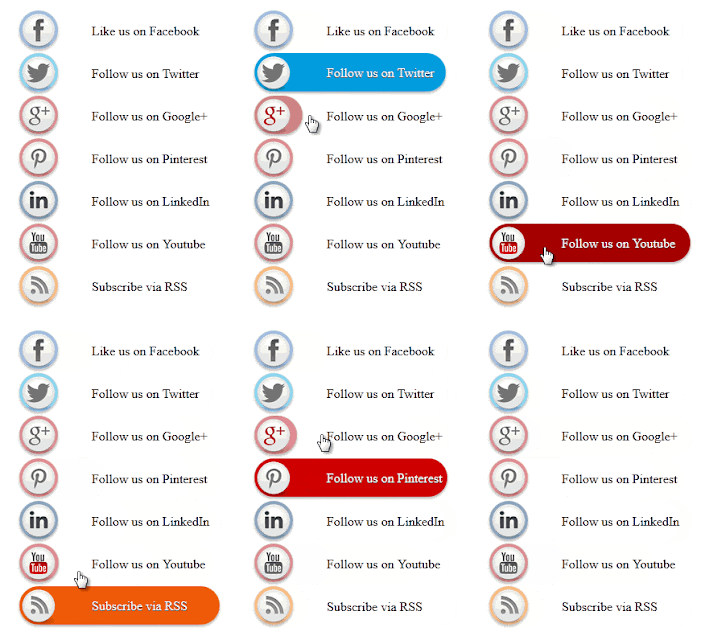
Adding Animated Social Media Widget to Blogger:
- Related Post: CSS Animated Social Share Buttons for Blogger!!!
This Social Media Widget includes 7 (seven) social media icons, these are Facebook, Twitter, Google Plus, Pinterest, LinkedIN, Youtube and RSS Feed. This is an animated social media widget, that is why it is very attractive. When you mouse hover on any media icon of this widget the color of that icon will appear behind it. Although the widget is very highly decorated but adding it to your blog/site is very easy. Because you can add this widget to your blog/site with a little customization. Let's add this Social Media Widget to Blogger. See the belo demo...
Demo--->
Adding Animated Social Media Widget to Blogger:
- First Sign Into your Blogger Account.
- Then click on Layout option and click Add a Gadget link where you want to place this widget.
- Then from the Gadgets list choose HTML/JavaScript.
- Now Copy the below code and Paste in the Content box.
- Then click on Save button to complete the addition.
<style>#WG-SWS {width: 260px;margin: 5px 20px;padding:5px;}#WG-SWS li {cursor: pointer;height: 48px;position: relative;list-style-type: none;}#WG-SWS .icon {background: #D91E76 url('https://blogger.googleusercontent.com/img/b/R29vZ2xl/AVvXsEi4-sW05RN6yg_lR4JrdfPsltj7Fu_M0M52TfruBFR57G3ymhcuBMLNLsdRiFWG7t3fXXToetnAVwhguXaRKDz7EI724LpXK4UJi5DwDblpu-MjGcDbRb30LXn3kTeGsBCmqMGZrQPxivM/s1600/NBT-Social_Button.png') 0 0 no-repeat;background-color: rgba(217, 30, 118, .42);border-radius: 30px;display: block;color: #0033CC;float:none;height: 48px;line-height: 48px;margin: 5px 0;position: relative;text-align: left;text-indent: 90px;text-shadow: #333 0 1px 0;white-space: nowrap;width: 48px;z-index: 5;-webkit-transition: width .25s ease-in-out, background-color .25s ease-in-out;-moz-transition: width .25s ease-in-out, background-color .25s ease-in-out;-o-transition: width .25s ease-in-out, background-color .25s ease-in-out;transition: width .25s ease-in-out, background-color .25s ease-in-out;-webkit-box-shadow: rgba(0, 0, 0, .28) 0 2px 3px;-moz-box-shadow: rgba(0, 0, 0, .28) 0 2px 3px;-o-box-shadow: rgba(0, 0, 0, .28) 0 2px 3px;box-shadow: rgba(0, 0, 0, .28) 0 2px 3px;text-decoration: none;}#WG-SWS span:hover {visibility: hidden;}#WG-SWS span {display: block;top: 15px;position: absolute;left: 90px;}#WG-SWS .icon {color: #fafafa;overflow: hidden;}#WG-SWS .fb {background-color: rgba(45, 118, 185, .42);background-position: 0 -382px;}#WG-SWS .twit {background-color: rgba(0, 161, 223, .42);background-position: 0 -430px;}#WG-SWS .google {background-color: rgba(167, 0, 0, .42);background-position: 0 -478px;}#WG-SWS .pint {background-color: rgba(204, 0, 0, .42);background-position: 0 -526px;}#WG-SWS .linked {background-color: rgba(0, 87, 114, .42);background-position: 0 -574px;}#WG-SWS .ytube {background-color: rgba(170, 0, 0, .42);background-position: 0 -670px;}#WG-SWS .rss {background-color: rgba(255, 109, 0, .42);background-position: 0 -718px;}#WG-SWS li:hover .icon {width: 250px;}#WG-SWS li:hover .icon {background-color: #d91e76;}#WG-SWS li:hover .fb {background-color: #2d76b9;background-position: 0 2px;}#WG-SWS li:hover .twit {background-color: #00A1DF;background-position: 0 -46px;}#WG-SWS li:hover .google {background-color: #A70000;background-position: 0 -94px;}#WG-SWS li:hover .pint {background-color: #C00;background-position: 0 -142px;}#WG-SWS li:hover .linked {background-color: #005772;background-position: 0 -190px;}#WG-SWS li:hover .ytube {background-color: #A00;background-position: 0 -286px;}#WG-SWS li:hover .rss {background-color: #EC5601;background-position: 0 -334px;}#WG-SWS .icon:active {bottom: -2px;-webkit-box-shadow: none;-moz-box-shadow: none;-o-box-shadow: none;}</style><ul id="WG-SWS">
<li><a class="icon fb" href="http://www.facebook.com/ittimesbd">Like us on Facebook</a>Like us on Facebook </li>
<li><a class="icon twit" href="https://twitter.com/ittimesbd">Follow us on Twitter</a>Follow us on Twitter </li>
<li><a class="icon google" href="https://plus.google.com/+Ittimesbd-com">Follow us on Google+</a>Follow us on Google+ </li>
<li><a class="icon pint" href="http://www.pinterest.com/ittimesbd">Follow us on Pinterest</a>Follow us on Pinterest </li>
<li><a class="icon linked" href="http://in.linkedin.com/ittimesbd">Follow us on LinkedIn</a>Follow us on LinkedIn </li>
<li><a class="icon ytube" href="http://www.youtube.com/user/ittimesbd">Follow us on Youtube</a>Follow us on Youtube </li>
<li><a class="icon rss" href="http://feeds.feedburner.com/ittimesbd">Subscribe via RSS</a>Subscribe via RSS</li>
</ul>
<li><a class="icon fb" href="http://www.facebook.com/ittimesbd">Like us on Facebook</a>Like us on Facebook </li>
<li><a class="icon twit" href="https://twitter.com/ittimesbd">Follow us on Twitter</a>Follow us on Twitter </li>
<li><a class="icon google" href="https://plus.google.com/+Ittimesbd-com">Follow us on Google+</a>Follow us on Google+ </li>
<li><a class="icon pint" href="http://www.pinterest.com/ittimesbd">Follow us on Pinterest</a>Follow us on Pinterest </li>
<li><a class="icon linked" href="http://in.linkedin.com/ittimesbd">Follow us on LinkedIn</a>Follow us on LinkedIn </li>
<li><a class="icon ytube" href="http://www.youtube.com/user/ittimesbd">Follow us on Youtube</a>Follow us on Youtube </li>
<li><a class="icon rss" href="http://feeds.feedburner.com/ittimesbd">Subscribe via RSS</a>Subscribe via RSS</li>
</ul>
Customization:
- Before saving the widget in the above code Replace ittimesbd with your Facebook, Twitter, Google Plus, Pinterest, LinkedIN, Youtube and Feedburner Username.
That's it. Now view your blog and you will see that the widget is showing your Social Media buttons.
Stay with www.iTTimebd.com for more IT related Post


