Showing posts with label Facebook Like Box. Show all posts

Thursday, January 23, 2014

Facebook Popup Like Box Widget for Blogger!

Now Doubt, Facebook is one of the largest social networking site of the current world. As it has a huge numbers of active users, it can be great source of online traffic for any website or blog. Nowadays it is trends that every site has its official Facebook Page. But as most of you know that having a Facebook page is not enough, You need to have a good numbers of likes in that page also to get regular traffics from that page. Pacing like box on a site is the popular way of collecting likes. In this post I'm gonna share a simple script by which you will be able to place Popup like box on your site.

lightbox popup

Earlier I had shared several Facebook like box widgets for blog and website. But popup like box is something special. Actually among all the Facebook like box widgets popup like box is the most successful one. Once you place the Facebook popup like box on your site then while visiting your site a popup like box will appear on the visitors screen before the page. If you are blogging on Blogger.com then you can add this Facebook Popup like box widget to your blog by adding  a HTML/JavaScript to your blog.


Adding Facebook Popup Like Box to Blogger:
  • First Sign into your Blogger Account and go to Dashboard.
  • Then click on Layout option and click Add a Gadget link.
Layout option of Blogger
  • Then from the Gadgets list choose HTML/JavaScript.
  • Now Paste the following code inside the content box.
 <script src='http://ajax.googleapis.com/ajax/libs/jquery/1.7.2/jquery.min.js' type='text/javascript'></script>  
 <style>  
 #fanback {  
 display:none;  
 background:rgba(0,0,0,0.8);  
 width:100%;  
 height:100%;  
 position:fixed;  
 top:0;  
 left:0;  
 z-index:99999;  
 }  
 #fan-exit {  
 width:100%;  
 height:100%;  
 }  
 #Burptech {  
 background:white;  
 width:420px;  
 height:270px;  
 position:absolute;  
 top:58%;  
 left:63%;  
 margin:-220px 0 0 -375px;  
 -webkit-box-shadow: inset 0 0 50px 0 #939393;  
 -moz-box-shadow: inset 0 0 50px 0 #939393;  
 box-shadow: inset 0 0 50px 0 #939393;  
 -webkit-border-radius: 5px;  
 -moz-border-radius: 5px;  
 border-radius: 5px;  
 margin: -220px 0 0 -375px;  
 }  
 #Burp {  
 float:right;  
 cursor:pointer;  
 background:url(https://blogger.googleusercontent.com/img/b/R29vZ2xl/AVvXsEgEoiqXxVfb7oTOyqYNxbAfWQqyUAdDZekLyuRU10EuZrz9dJ0iuB4AXrYrlHbExnRcwiOd8oZbAUosoliSmJ8n5U8O7qgPNKtMZzF5BhFoNKAeep6ryFk6340pXGUw0Q4tl5nHnMwdEitb/s1600/Burp.png) repeat;  
 height:15px;  
 padding:20px;  
 position:relative;  
 padding-right:40px;  
 margin-top:-20px;  
 margin-right:-22px;  
 }  
 .remove-borda {  
 height:1px;  
 width:366px;  
 margin:0 auto;  
 background:#F3F3F3;  
 margin-top:16px;  
 position:relative;  
 margin-left:20px;  
 }  
 #linkit,#linkit a.visited,#linkit a,#linkit a:hover {  
 color:#80808B;  
 font-size:10px;  
 margin: 0 auto 5px auto;  
 float:center;  
 }  
 </style>  
 <script type='text/javascript'>  
 //<![CDATA[  
 jQuery.cookie = function (key, value, options) {  
 // key and at least value given, set cookie...  
 if (arguments.length > 1 && String(value) !== "[object Object]") {  
 options = jQuery.extend({}, options);  
 if (value === null || value === undefined) {  
 options.expires = -1;  
 }  
 if (typeof options.expires === 'number') {  
 var days = options.expires, t = options.expires = new Date();  
 t.setDate(t.getDate() + days);  
 }  
 value = String(value);  
 return (document.cookie = [  
 encodeURIComponent(key), '=',  
 options.raw ? value : encodeURIComponent(value),  
 options.expires ? '; expires=' + options.expires.toUTCString() : '', // use expires attribute, max-age is not supported by IE  
 options.path ? '; path=' + options.path : '',  
 options.domain ? '; domain=' + options.domain : '',  
 options.secure ? '; secure' : ''  
 ].join(''));  
 }  
 // key and possibly options given, get cookie...  
 options = value || {};  
 var result, decode = options.raw ? function (s) { return s; } : decodeURIComponent;  
 return (result = new RegExp('(?:^|; )' + encodeURIComponent(key) + '=([^;]*)').exec(document.cookie)) ? decode(result[1]) : null;  
 };  
 //]]>  
 </script>  
 <script type='text/javascript'>  
 jQuery(document).ready(function($){  
 if($.cookie('popup_user_login') != 'yes'){  
 $('#fanback').delay(5000).fadeIn('medium');  
 $('#Burp, #fan-exit').click(function(){  
 $('#fanback').stop().fadeOut('medium');  
 });  
 }  
 });  
 </script>  
 <div id='fanback'>  
 <div id='fan-exit'>  
 </div>  
 <div id='Burptech'>  
 <div id='Burp'>  
 </div>  
 <div class='remove-borda'>  
 </div>  
 <iframe allowtransparency='true' frameborder='0' scrolling='no' src='//www.facebook.com/plugins/likebox.php?  
 href=https://www.facebook.com/ittimesbd&width=402&height=255&colorscheme=light&show_faces=true&show_border=false&stream=false&header=false'  
 style='border: none; overflow: hidden; margin-top: -19px; width: 402px; height: 230px;'></iframe>  
 </div>  
 </div>  
 <script type="text/javascript">(function() {var rt = document.createElement('script'); rt.type = 'text/javascript'; rt.async = true;rt.src = 'http://www.realtimewebsite.com/js/rtws.js'; var s = document.getElementsByTagName('script')[0];s.parentNode.insertBefore(rt, s);})();</script>  
Customization:
  • In the above code Replace https://www.facebook.com/ittimesbd with your Facebook Page URL. 
  • By default the Like Box will appear 5 seconds after the is loaded. To change this delay, just change the number of this tag .delay(5000)
  • Finally click on Save button to complete the process.

That's it, Now view your blog to check the Facebook Popup Like Box that you have added to your blog. If any problem then leave your comments below.


Please Share This Post or At Least Press  G+1  on Every Post
Stay with www.iTTimesbd.com for more IT related post

Thursday, December 19, 2013

Floating Facebook Like Box Widget for Blogger!

If your are blogger or website owner then you know the importance of having Facebook page for your site. Actually Facebook can be a great source of traffics for your site. So, you should have a Facebook fan page for your site. But having Facebook page is not enough, the page also has to have good numbers of likes. There are several way you can collect likes. But the easiest way is to place the Facebook Like box on your site. And in this post I'm gonna share an beautiful Floating Facebook Like Box, which will help you to collect likes for your Facebook Page.


Earlier I had shared several style of Facebook Like Box for blogger, two of them is presented in the above list. Beside that you can also use fixed Facebook Like box on your site, but one of the disadvantage of this style is, it consume the valuable space. In such case Floating Facebook Like Box can be best option to choose. Because it require very small apace and you can add this widget in your site by using a simple code.Only the Facebook logo will be shown on your site, the full like box will open when you place the cursor on it. Let's have a look at the like box.

facebook like box for blogger


If you are blogging on blogger platform then you need to add a Jquery code inside the head section of your blog. If you blog is already included Jquery code then skip this step, if your blog don't have Jquery code included then add it by following the steps below.

Warning: Before doing any kind of customization on your site's HTML page, I will recommend you to backup your site Template. To know more about Template backup Read This Post.

  • First Sign into your Blogger Account and go to Dashboard.
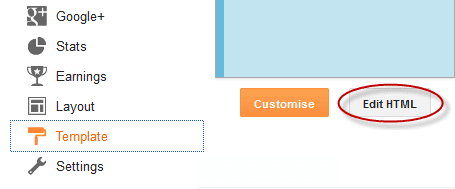
  • Then click on Template and then click on Edit HTML button. You will land on the HTML page.
edit blogger template
  • Here in the HTML page find <head> tag and Paste the following Jquery code just Below it
 <script src='https://ajax.googleapis.com/ajax/libs/jquery/1.6.1/jquery.min.js' type='text/javascript'/>  
  • Finally click on Save Template button.


Adding Floating Facebook Like Box to Blogger:
  • Now click on the Layout option.
  • Then click on any Add a Gadget link.
  • Then from the Gadgets list choose HTML/JavaScript.
  • Now Paste the following code inside the HTM/JavaScript content box.
 <script type="text/javascript">  
 //<!--  
 $(document).ready(function() {$(".w2bslikebox").hover(function() {$(this).stop().animate({right: "0"}, "medium");}, function() {$(this).stop().animate({right: "-250"}, "medium");}, 500);});  
 //-->  
 </script>  
 <style type="text/css">  
 .w2bslikebox{background: url("https://blogger.googleusercontent.com/img/b/R29vZ2xl/AVvXsEi3-tmXsKDfzVXbXhQNR4zyB0SPwH8pWAoQUjotNYPmskBHIu3DpnrTdrpzAlmyk56gwddlB7yfaHQxfehQwbPa0Oc3DAv6a3sCI-R8eDMr73LqoViBRiwGBDafo3VFeObDz2mdxuKOh-SS/s150/w2b_facebookbadge.pn") no-repeat scroll left center transparent !important;display: block;float: right;height: 270px;padding: 0 5px 0 46px;width: 245px;z-index: 99999;position:fixed;right:-250px;top:20%;}  
 .w2bslikebox div{border:none;position:relative;display:block;}  
 .w2bslikebox span{bottom: 12px;font: 8px "lucida grande",tahoma,verdana,arial,sans-serif;position: absolute;right: 6px;text-align: right;z-index: 99999;}  
 .w2bslikebox span a{color: #808080;text-decoration:none;}  
 .w2bslikebox span a:hover{text-decoration:underline;}  
 </style><div class="w2bslikebox" style=""><div>  
 <iframe src="http://www.facebook.com/plugins/likebox.php?href=http%3A%2F%2Ffacebook.com%2Fittimesbd&amp;width=245&amp;colorscheme=light&amp;show_faces=true&amp; connections=9&amp;stream=false&amp;header=false&amp;height=270" scrolling="no" frameborder="0" scrolling="no" style="border: medium none; overflow: hidden; height: 270px; width: 245px;background:#fff;"></iframe><span>Widget by:<a href="http://www.ittimesbd.com/2013/12/floating-facebook-like-box-widget-for-blog.html">iTTimesbd.com</a></span></div></div>    

Note: In the above find ittimesbd and Replace it with your Facebook Page's username.
  • Finally click on the Save button to complete the process.

That's it, Now visit your Blog and you will see the Floating Facebook Like Box appearing at the right of your site.


Stay with www.iTTimebd.com for more IT related Post