

Shortcut virus is one of the most problem that PC, flash drive or pen drive users face. It is very hard to find a PC or Pen-drive user who don't have faced shortcut virus problem. Basically shortcut virus spread from PC to PC via pen drive. Sometimes when you share your pen drive with your friends or when you use others pen drive in your PC, then shortcut virus may catch your pen drive. In this post I'm gonna show to how to remove shortcut virus from pen drive.
There are several way you can remove shortcut virus from your pen drive or flash drive. But one of the most success way to to remove shortcut virus from pen drive, it to use CMD command. I have also shred USB Fix shortcut virus remover in this site. Today's post I am gonna show how to remove shortcut virus from pen drive using CMD command.
Remove Shortcut Virus from Pendrive:
- First insert the Pendrive into your PC that affected with shortcut virus.
- Then open the Run option (Press Windows Key+R).
- Then type CMD in Run and press Enter. A command prompted will open.
- In the opened command prompt, Type your Pendrive Drive's letter as shown in the below image.
- For Example: If your Pendrive Drive's letter is G. Then type G: and press Enter. (To find the Pendrive Drive's letter just go to My Computer and check your drive icon)
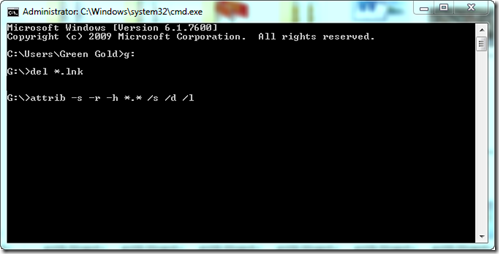
- Then type del *.lnk and press Enter.
- Finally type attrib -h -r -s /s /d g:\*.* and press Enter. (Replace g with your Pendrive drive's letter)
That's it. Now wait a few seconds, Then open and check your drive. Your folders will be retrieved.
Other Post Related To PC-Solution
Stay with www.iTTimesbd.com for more IT related post