Showing posts with label Virus. Show all posts

Tuesday, November 19, 2013

How to Remove Shortcut Virus from PenDrive (CMD)

pendrive shortcut virus

Shortcut virus is one of the most problem that PC, flash drive or pen drive users face. It is very hard to find a PC or Pen-drive user who don't have faced shortcut virus problem. Basically shortcut virus spread from PC to PC via pen drive. Sometimes when you share your pen drive with your friends or when you use others pen drive in your PC, then shortcut virus may catch your pen drive. In this post I'm gonna show to how to remove shortcut virus from pen drive.

There are several way you can remove shortcut virus from your pen drive or flash drive. But one of the most success way to to remove shortcut virus from pen drive, it to use CMD command. I have also shred USB Fix shortcut virus remover in this site. Today's post I am gonna show how to remove shortcut virus from pen drive using CMD command.


Remove Shortcut Virus from Pendrive:
  • First insert the Pendrive into your PC that affected with shortcut virus.
  • Then open the Run option (Press Windows Key+R).
  • Then type CMD in Run and press Enter. A command prompted will open. 
  • In the opened command prompt, Type your Pendrive Drive's letter as shown in the below image.
  • For Example: If your Pendrive Drive's letter is G. Then type G: and press Enter. (To find the Pendrive Drive's letter just go to My Computer and check your drive icon) 
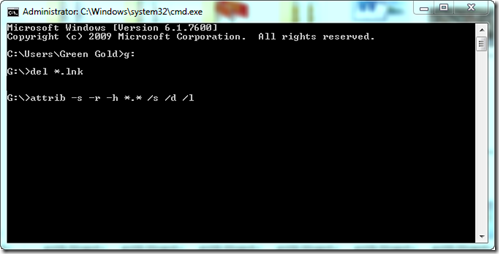
 shortcut virus removal
  • Then type del *.lnk and press Enter.
  • Finally type attrib -h -r -s /s /d g:\*.* and press Enter. (Replace g with your Pendrive drive's letter)

That's it. Now wait a few seconds, Then open and check your drive. Your folders will be retrieved.

Other Post Related To PC-Solution

Stay with www.iTTimesbd.com for more IT related post

Tuesday, February 19, 2013

Various Symptoms Of Computer Virus Attack!!

virus attacked computer
Hello everyone I hope that you are all well. Now come to the topic, New user of the computer they don't have enough knowledge about virus. That is why many of us don't able to find out the presence virus in our computer.


If your computer is attacked by virus or if there is any virus in your computer you will see some symptom. But you don't understand then you will be unable to understand that your computer is in trouble. In Today's post I am presenting some symptom if your computer have any virus. The virus presence symptom are given below.
  1. Computer Speed will be getting slow.
  2. Software, Games, even Audio-Video files will take more time to open.
  3. Bad center will be shown repeatedly on disk.
  4. The font of the word pad and note pad  could be damaged.
  5. RAM, (AGP) May show less.
  6. DISK volume may change.
  7. It will take more time to save or load anything.
  8. CD, DVD copying may take more time.
  9. Hard Disk space can be reduced.
  10. Unknown file extension can be seen.
  11. The program will be run automatically or closed.
  12. Folder will be deleted.
  13. Insert it in Word or notepad some cases can not be saved.
  14. Using the keyboard and mouse can be problem.
  15. Before the games properly and avoid evil without them no reason to be stuck during repeated.
  16. PC Freezing Problem.
  17. Task manager will not work.
  18. In many cases different folders icons can not be changed.


Stay with TecHie-ASiF for more IT related post

Wednesday, February 13, 2013

How To Know If Your Computer Has Virus!!!

checking pc virus

Sometimes when our are computer are attacked by virus and they shows the symptom. But maximum time we do not understand those symptom. That is why we do not get know that our computer is attacked by virus and our computer fall in trouble.


But using a little notepad trick we can check that your computer has virus or not. Earlier post I had showed How To Create Clock Using Notepad. Today I will show How To Check Computer Virus Attack. Let's see how to check it...


Checking Computer Virus Attack:
  1. At first open  Run option (use Windows Key+R).
  2. Than Type system.ini and press Enter.

 If your Computer Is Attacked by virus than some text will appear on your computer like below.

woafont=dosapp.fon
        EGA80WOA.FON=EGA80WOA.FON
        EGA40WOA.FON=EGA40WOA.FON
        CGA80WOA.FON=CGA80WOA.FON
        CGA40WOA.FON=CGA40WOA.FON 


Stay with TecHie-ASiF for more IT related post