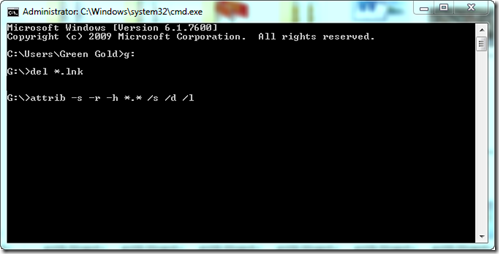
Shortcut virus is most disturbing and problem creating virus. Most of the computer, usb drive or pendrive e have already faced the Shortcut virus problem. If your drive is infected with this virus then file saved in it will be turned into Shortcut folders or files. There are several way like CMD command or Software by which you can remove this shortcut virus. I have already published the CMD command method. It is given below.

Though the above method is working well, but some of my readers and friends are asking to share a post regarding Shortcut Virus Remover software. In this post I am going to share a Shortcut virus remover software named UsbFix. It is totally free and safe. Get the software from the below link. Its only 2.68 mb in size.
About UsbFix:
UsbFix is one of the top rated shortcut virus remover with more than 3000000 million users. It is fast free and powerful. It is a fast infection treatment system and infection found by this software are automatically sent to its development center for further update. It will not only remove shortcut virus but also remove malware from your USB disk. UsbFix vaccinate your USB against further virus attack and creating shortcuts.

How To Use:
Note: To know more you can visit the tutorial page of UsbFix. Click Here UsbFix Tutorial.
- Related Post: How to Remove Shortcut Virus Without Software.
Though the above method is working well, but some of my readers and friends are asking to share a post regarding Shortcut Virus Remover software. In this post I am going to share a Shortcut virus remover software named UsbFix. It is totally free and safe. Get the software from the below link. Its only 2.68 mb in size.
About UsbFix:
UsbFix is one of the top rated shortcut virus remover with more than 3000000 million users. It is fast free and powerful. It is a fast infection treatment system and infection found by this software are automatically sent to its development center for further update. It will not only remove shortcut virus but also remove malware from your USB disk. UsbFix vaccinate your USB against further virus attack and creating shortcuts.
Before running the software you need to connect your Drive or Pen Drive to your PC.
- First download the software from above link. It is in a Zip folder.
- Then Unzip the folder and Double click UsbFix.exe to Install it.
- After installation UsbFix will automatically open.
- Here on UsbFix click on Research and It will start to research your PC drive and Pen Drive.
- After researching your drive it will show the report in Notepad.
- If your Drive have virus then click on Clean to remove the virus.
- Click on Vaccinate to protect your USB from further virus attack.
Note: To know more you can visit the tutorial page of UsbFix. Click Here UsbFix Tutorial.
NB: One thing I want to share that I have removed shortcut virus using CMD method and that is why actually I don't know how the software works. I have shared this information collecting from several site. So, I really need to know your feedback about this software. Please leave your valuable comment.
Stay with www.iTTimesbd.com for more IT related Post.