Showing posts with label YouTube Videos. Show all posts

Tuesday, May 5, 2015

How to Watch YouTube & Dailymotion Videos on VLC!

Play Dailymotion Videos with VLC
Watching videos online is a very popular trends now. And for watching videos online YouTube and DailyMotion are very popular sites. But sometimes the default online player of these sites may not work for you properly, because of your browser error or any other reason. In such cases you can use your VLC Media Player to watch YouTube and DailyMotion videos. And In this post I am gonna share the trick of watching YouTube and DailyMotion videos with VLC player.


VLC Media Player Have the Capability to Play Videos with all most all Video Formats , Probably this is the One reason Why VLC media player is the most Preferred Media player, Beside that LC player is capable of playing online videos. Yes you can watch online videos like YouTube or DailyMotion videos directly on your VLC player without using any browser.


Some More Advantages of Watching Online Videos in VLC Media Player:

  • Watch Online Videos without Ads, Means no Disturbance While Watching your Favorite Video.
  • Use Loop Button To Watch a Video Again and again Many times.
  • Increase or Decrease the Speed of the Video.
  • Take Snapshots of any particular Screen of a Song or Movie.


Steps to Watch Online Videos on VLC Player:

  • First open your VLC media player and Click on File > Open Network Or Simply Press CTRL+N to Open Network URL Dialog box.
  • Now go to any site like YouTube or DailyMotion and play the video that you wanna on VLC player.
  • Then Copy the Video URL from the address bar and Paste it in the Network URL Dialog box.
  • And finally click on Play button.

Paste YouTube URL on VLC player


That's it, very simple and easy steps to follow. Now you can enjoy watching online videos directly on your VLC player. As I know beside YouTube and DailyMotion VLC player is capable of playing online videos of many other site also. But I have tested any other sites. If you can play others site's videos on VLC the please don't forget to mention site's name in the comment below.


Related : Best Online YouTube Video Downloader Site!


Please Share This Post or At Least press g+1 on Every Post
Stay with www.iTTimesbd.com for more IT related post

Friday, May 1, 2015

Best Online YouTube Video Downloader Site [Ad Free]

YouTube Videos Download
Undoubtedly YouTube is the largest and most popular video sharing site, there is nothing to debate on it. But the biggest disadvantage of YouTube is, there is no download option to download legally. We can only use third party software and website to download YouTube video. But all of them has some disadvantages and limitation. But the site that I am gonna discuss today will definitely give you the complete hassle free solution to download YouTube videos.


There are several site available throughout the web. But most of them are overloaded with ads and many of them often fail to get the download link. The site that I am going to introduce with you - AGL YouTube Downloader is, one of the best website to download videos. It is I think one of the best website to download video directly from YouTube, It supports download managers and Proxy websites moreover it has the ability to Resume Downloads and has No ads.


Download Procedure: There are two different way to download videos from YouTube by the AGL website. These are...

Direct Download Method:
  • In this method you need to add agl before the youtube of your desired YouTube link.
  • After changing the link paste it in the browser's address bar and press Enter.
  • Now you will get download links of different format, click them to start download.

Copy and Paste Method:
  • First go to the YouTube.com and play the video that you wanna download.
  • Then Copy the Video URL from the address bar.
  • Now go to the AGL YouTube Downloader website from the link given below.
  • Then in that site Paste the Video URL and click Download button.
youtube video download online


That's now you will get several download links of different format, click any one of them to start download.


Website Link :-  AGL Youtube Downloader


Please Share This Post or At Least press g+1 on Every Post
Stay with www.iTTimesbd.com for more IT related post

Friday, January 16, 2015

How to Download Facebook Videos Online!

download facebook video
Facebook is world's no.1 social networking site. Status updating and sharing photos is very common activities of Facebook users. But nowadays video sharing tendency is getting popularity. And it becomes a great source of important videos. Sometimes you may had wanted download videos from Facebook. Though downloading videos from Facebook is very easy task, but it is not as common task as downloading videos from YouTube. In this post I'm gonna show how to download.

There are several way by which you can download videos from Facebook. Among them the easiest way to download Facebook Videos directly from online. There are several site available on internet that allow you to download Facebook videos online. SaveFrom.net is such an website by which you can download your favorite Facebook Videos. You ca also download YouTube videos from here. Lets see the download procedure...


Downloading Facebook Videos Online:
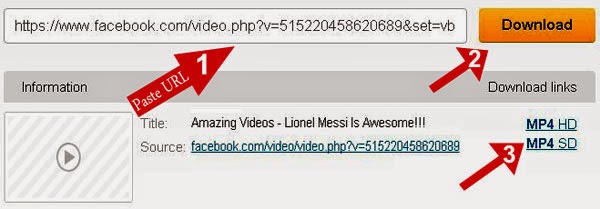
  • First go to this site SaveFrom
  • Then paste your Facebook Video URL in the Enter the URL box.
  • Then click on the Download button.
  • Then you will see link of that videos in different format and size at right.
  • Now click any one of these download link and the download will begin.
facebook video downloader

That's it now you can download your favorite Facebook Videos very easily. This site supports more than 30 popular sites. So, beside Facebook and YouTube you can download videos from those sites too.


Stay with www.iTTimesbd.com for more IT related Post

Friday, December 12, 2014

How to Download Part of a YouTube Video!

Video Online Converter
As the largest online video sharing site YouTube is the greatest source of videos on various topics. When you download any video from YouTube you have to download the whole video, though you needs a part of that video. And it cost huge amount of data and valuable time as well. But both of your data and time can be saved, if you download only the part you need out of that large video! In this post I am gonna show how you can download part of a YouTube video.

There are several site available on internet to download YouTube videos. But most of the will allow you to download the whole video. Today I am gonna introduce you to the Clip Converter - Free Online Media Recorder. Clip Converter is a free online media conversion application, which allows you to record, convert and download nearly any audio or video URL to common formats.

Clip Converter Supports:
  • YouTube.
  • Google Videos.
  • Daily Motion,
  • MySpace, Metacafe, 
  • Sound-cloud, Vimeo and many more.

If you enter the URL from your media page, this site will try to detect the media file. Afterwards Clip Converter records the media file to one of its servers. There it will be converted to your chosen format and after finishing the conversion you are able to download the file. Follow the below steps to download part of a YouTube video.


Get the YouTube Video URL:
  • First go to the www.YouTube.com
  • Then Find and Play the video that you want to convert.
  • Now Copy the Video URL from the browser Address Bar. And close the YouTube.

Downloading Part of a YouTube Video:
  • First go to this site Clip Converter
  • Then Paste the YouTube URL in the Media URL box and click on Continue button.
    Clip Converter YouTube URL
  • Then you will have to Select the following options as you want.
    • Detected Media: It shows the Video quality with size.
    • Conversion Format: It shows several video conversion format.
      Note: Click on Download button, if you want download full video.
      Clip Converter conversion
  • Then Unmark the Start of Video and End of Video options, now you will be able to cut the video. But you must know the exact time of the part you wanna download.
  • Now enter the starting and the ending time of your video as HH:MM:SS like the below image.
  • Then click on Start button and and wait for the download button to be appeared.
  • Finally click on Download button to download the part of your YouTube video.
    Clip Converter YouTube Part

I hope this method will help you to download specific part of your desired videos however if you face any problem or you have any question then feel free to ask in comment section.


Stay with www.iTTimesbd.com for more IT related Post

Thursday, December 11, 2014

Free Youtube to MP3 Converter Online!

free youtube to mp3 converter
YouTube is the world largest video sharing site. It is a great source of video on various topics. Today's discussion topic is video songs. If you want to download songs from YouTube then you will have to download it in video format which may cost much of your data. To save your data you should download it in MP3 format. You have to convert YouTube videos to MP3 before download it. In this post I'm gonna show how to convert and download YouTube videos in MP3 format online.

There are several sites available on internet to convert and download YouTube videos in MP3 format. In this post I'm using YouTube-mp3.org. YouTube-mp3.org is the easiest online service for converting videos to mp3. You don't have to create account in this site, the only thing you need is a YouTube URL. It will start to convert the audiotrack of your videofile to mp3 as soon as you have submitted it and you will be able to download it. And this whole service is completely free. Let's see how to do it.


Get the YouTube Video URL:
  • First go to the www.YouTube.com
  • Then Find and Play the video that you want to convert.
  • Now Copy the Video URL from the browser Address Bar.

Converting YouTube to MP3 Online:
  • First go to this site www.YouTube-mp3.org
  • Then in the URL box paste your YouTube Video URL.
  • Then click on Convert Video button to start the conversion.
    youtube to mp3 converter Paste URL
  • When the conversion is completed, click on Download link.
    youtube to mp3 converter and donwload

That's it. Now your YouTube video will be downloaded in MP3 format. All conversions of this site will be perfomed in high quality mode with a bitrate of at least 128 kBit/s and it need approximately 3 to 4 minutes per video.


Stay with www.iTTimesbd.com fore more IT related Post

Friday, February 21, 2014

How to Download Youtube Videos in Google Chrome!

YouTube is the largest and most popular online video watching and sharing site. YouTube has the largest collection of videos on various topics. Sometimes we need to download videos from Youtube. But YouTube does not have any video downloading option. That is why users have to use third party software to download Youtube videos. But beside software users can download youtube videos by using Browser extension or add ons.
youtube downloader chrome


  • Earlier I Have Shown:
  1. How To Download Youtube Videos Without Any Software.
  2. How To Download Youtube Videos In Firefox.

Today I will show How To Download Youtube Videos Using Google Chrome.


Follow the below steps to Download Youtube Videos:
  1. At first open your Google Chrome browser.
  2. Then get the Youtube downloader from here YouTube Downloader
  3. Then you will see Ultimate YouTube Downloader and then click +Add to Chrome.
  4. Then if ask for any permission to add this extension to your google chrome then allow it.
  5. Wait a few seconds and Youtube downloader extension will be installed to your Google Chrome.
  6. Then go to YouTube.com and play a video and you will see the Download option just below the playing video.

    youtube download chrome

  7. Then click Download button and you will get different format to download this video. Select any one and the video downloading will start.

Other Browser Related Post Here: Browser Tips & Tricks


Stay with www.iTTimebd.com for more IT related Post

Monday, November 25, 2013

How to Convert 2D Videos into 3D on YouTube!

Convert 2D Videos into 3D
3D or 3rd dimension videos is one of the latest video format which gives the audience the live experience of any scenery that he is watching. That when you see any video in 3D then then video will seems to live. Its really exciting. And this excitement now you can experience on YouTube. Yes on YouTube. Now you can watch 3D videos on YouTube without any extra effort. In this post I'm gonna show how you can convert any 2D videos to 3D on YouTuve.

Recently YouTube has added an excellent feature by which you can easily convert your YouTube videos from 2D to 3D from YouTube control panel. And you can watch it by using 3D glass. This conversion feature is available in YouTube beta version. Normally to make 3D videos you will have to shoot it with two cameras. But in YouTube you will be able to convert any 2D video to 3D by going through a few simple steps.

3D videon in YouTube

When you convert any video to 3D in YouTube the it will look like the above image. Lets see the conversion procedure.


Converting YouTube videos to 3D:
  • First Log into your YouTube account.
  • Then from your YouTube account Upload a 2D video.
  • Then click on Edit info of that video which you want convet into 3D.
  • And finally click on 3D Video to start the conversion. 

Thats it now your 2D video will be converted into 3D video, and you will have to use 3D glass to watch this 3D video.


Stay with www.iTTimesbd.com for more IT related post

Tuesday, November 12, 2013

How to Download YouTube Videos in Firefox!

download youtube videos
YouTube is the world's largest video sharing site. Everyday a lots of people are sharing and watching videos on YouTube. The world largest collection of videos are here in the YouTube. There are many types of videos in YouTube like cooking, educational and entertainment etc. Sometimes we need to download videos from YouTube. 

Generally we use Internet Download Manager or YouTube Download Manager to download videos from YouTube. But using a little YouTube Video Download add-on in your Firefox browser you can download any YouTube video without any software. Using the addon you can download YouTube video just by one click.

Downloading YouTube Videos in Firefox:
  1. At first open your Firefox browser.
  2. Now get this add-ons from here Firefox Add-on.
  3. Then You will see 1-Click YouTube Video Download.
  4. Now click on +Add To Firefox button.
  5. Then the add-on will be installed and then you will have to restart your Firefox Browser.
  6. Now go to YouTube and play your desired videos. Here you will see a Download button below the YouTube video player.
  7. Click the Download button and you will get you video in different format, click any one of them and your video downloading will start.
    YouTube download option

That's it. Now you can Download YouTube Videos In Firefox.

Browser Related Posts: Browser Tips & Tricks

Stay with www.iTTimesbd.com for more IT related Post

Wednesday, September 18, 2013

How to Watch YouTube Videos without Buffering!

Watch Videos Without Buffering
YouTube is the world largest and the best video sharing site of the world. Almost all types of video here you can find. Every day a lot of people use YouTube to share or watch video. Basically people use Youtube for watching video. Buffering is the main problem for the YouTube users. if you have slow internet speed then it will be very irritating for you to watch videos on YouTube. But using a little tricks you can Watch YouTube Videos Without Buffering on slow connection.


Watching YouTube Videos Without Buffering:
  • Incase of Internet speed is lower than 40 kbps.
In this method you have to have VLC player or Realplayer.

If you don't have get from here VLC Player or Realplayer.

  • Install and open any one of these player.
  • Go to YouTube and Copy your desired video link.
  • Now Paste the link on your player.(Press Ctrl+V to Paste.

That's it. then the video will be loaded on your player and you will be able to watch 
YouTube videos on slow internet connection.


Stay with www.iTTimesbd.com for more IT related Post

Thursday, May 16, 2013

Google Introduced Youtube Paid Subscriptions !!!

youtube paid subscriptions

Recently channel subscription feature has started by Google's video sharing and watching website YouTube. This new feature has added them in the internet related subscription service competition. In the YouTube blog they said from the next Friday through this program YouTube user can watch 50 channel by paying 99 cent per month.

  • Related Posts:
  1. How To Download Youtube Videos Without Software
  2. How to Download Youtube Videos in Google Chrome!
  3. How To Download Youtube Videos In Firefox!!!
  4. How To Watch YouTube Videos Without Buffering

In this package each channel subscription has 14 day trial. Annual discount also made available. User can watch this site from computer, mobile, tablet or Television. YouTube also said that they will be added this site into other device also.


Now this subscription channel service is only available for 10 countries, more country will be added soon. Google had bought YouTube at 1.65 billion dollar in 2006. Their main objective was to increase income through advertisement. But they are providing this service for free yet. To attract the advertiser YouTube adding new topics like Animation video, Cinema etc. "Acorn TV" has added to this new pay channel. User can watch British Program for just only 4.99 dollar.


Stay with www.iTTimebd.com for more IT related Post

Thursday, February 21, 2013

How To Download YouTube Videos ONLINE!!


youtube video downloader online
Hello everyone I hope that you all well by the grace of Allah. I also hope that you all living technology very well. Today I am presenting a nice tips for you.Earlier I have shown How To Watch YouTube Videos Without Buffering. 

All of us very familiar with ''youtube'' who use computer and internet. We watch various kinds of video on Youtube, we also want to download video from Youtube. Most of the time we use third party software to download video. But by following the process you can download video directly from youtube. The process is given below. 


Procedure to Download Youtube Videos:
  1. At first play the video and edit the video link from the address bar.
  2. Then write SS  in the place of   http//www.  then click  ''Enter''.
  3. Then you will find the option to download the video.


Example: 

Let your video link is ''http//www.youtube.com/watch?abcde ''.
      Then edit the link and type ''ssyoutube.com?watch?abcde ''.


If you have any query then don't forget to left your valuable comment.
how to download youtube videos how to download from youtube how to download music from youtube how to download youtube videos in laptop how to download youtube videos in mobile how to download youtube videos on pc how to download youtube videos on iphone how to download songs from youtube how to save youtube videos how to download youtube videos on android how to download music from youtube to computer how to download youtube videos without any software how to download youtube videos on mac how to convert youtube to mp3 how to download music from youtube on android how to download youtube video in gallery how to download movies from youtube how to download mp3 from youtube how to save youtube video in gallery how to download youtube videos for free how can i download youtube videos how to save youtube videos to gallery without any app how to download youtube playlist how to download mp3 songs from youtube how to download youtube videos in mobile gallery
Stay with TecHie-ASiF for more IT related post